
Version 5.5 of concrete5 includes a much improved, more consistent user interface. It is unified between the front-end dialog boxes and the dashboard panes, which appear one to a page.
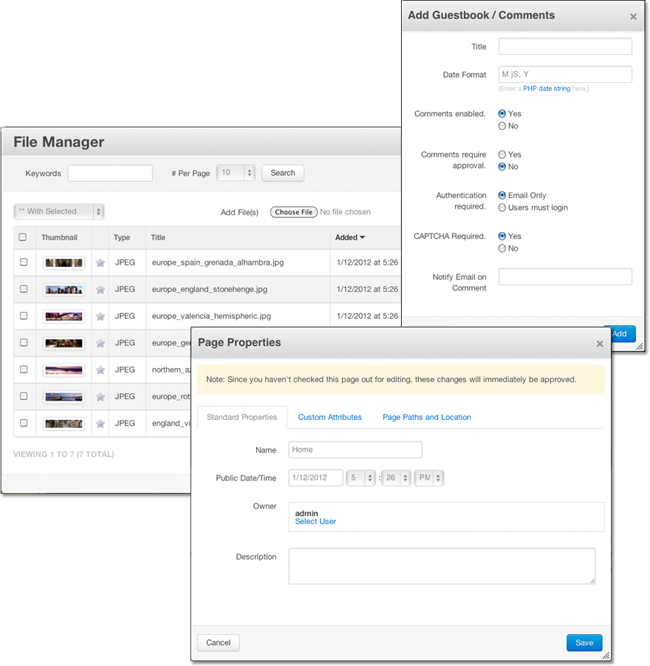
This normalization and attractive appearance is due in no small part to the usage of Twitter Boostrap, an open source user interface toolkit provided by the developers of Twitter.
What is Twitter Bootstrap?
Bootstrap is a UI framework for web applications, created by the engineers at Twitter. It provides HTML markup for common web problems like forms, tables, application alerts, popovers, layout grids, and more, as well as the CSS to render these items in an attractive way. Bootstrap makes your buttons, form elements, menus, navigation items, and typography all look nice.
Current Version
Version 5.5 of concrete5 shipped with a customized version of Twitter Bootstrap v1.3.0. As with all our included JavaScript libraries, we will be updating this on a periodic basis, with our new releases. The next update will come after 5.5.1.
From version 1.2 on, Bootstrap included some basic JavaScript libraries for interacting with its animated elements. We use the popover and tooltip libraries from Bootstrap, but not the dialog class. We now use jQuery UI's dialog class in concrete5, with a customized jquery.ui.css file that makes everything appear unified. We're sweating the details.
Implementation
At concrete5 we were very impressed by the end result of Bootstrap, and by the markup used to create it. Additionally, using a popular UI framework that many web developers would soon be familiar certainly wouldn't hurt, either.
Unfortunately, we couldn't just drop bootstrap into the header of our applications, while logged in. Part of this is because Bootstrap is somewhat greedy with its styles: it intends to be used as an integral part of a startup web application. It wasn't built to be included alongside other CSS (and especially wasn't meant to coexist side-by-side with a theme that was built with no knowledge that Bootstrap was on its way.)
So what did we do? We modified the bootstrap libraries to be namespaced inside a "ccm-ui" class. That means that you can include our Bootstrap CSS (which is a part of the minified ccm.app.css file) and Bootstrap will remain silent and watching – until you include wrap some HTML inside a ccm-ui class. At that point Bootstrap will kick into gear, and everything inside that DIV will have Bootstrap styles applied to it.
Can I just "drop in" a new copy of Twitter Bootstrap?
No. Due to the way we've included Bootstrap, you can't just overwrite some files. We actually make some fairly extensive customizations (by hand) to the file.
Using Bootstrap with your blocks, Dashboard Pages, and More
So how do you use Bootstrap in your custom concrete5 pages, blocks and applications? We've written some guidelines for writing extensions to the 5.5 dashboard and writing blocks 5.5 that automatically wrap the dialogs in the Bootstrap styles:
This guide shows how you can make your blocks automatically wrap their forms in the ccm-ui class, and make your dashboard pages do the same. Additionally, the instructions will add new capabilities to your dashboard pages, such as the ability to add them to 5.5's quick navigation, and automatic second level dashboard navigation.
Going Forward
Version 5.5 is concrete5's biggest UI overhaul yet, and presents the most cohesive, unified and detail-oriented interface we've ever shipped. We're really proud of it, and Bootstrap is a large portion of that. Dive into Bootstrap and start building beautiful concrete5 interfaces.