• Join Now
  • Sign In
  • Cart
  • Instant Setup
  • Download
Logo
  • About
    • Try it Out
    • For Developers
    • For Agencies
    • For Designers
    • For Anyone
    • Testimonials
    • Showcase
    • History
    • Our Philosophy
    • Credits
    • What does free mean?
    • Blog
  • Community
    • Members
    • Forums
    • Chat
    • Karma
    • International
    • Jobs
    • eNewsletters
  • Developers
    • Download concrete5
    • Join Beta Team
    • Translate concrete5
    • Bug Tracker
    • Submit to Marketplace
    • Code Submissions
    • News
    • Community Leaders
  • Marketplace
    • Add-Ons
    • Themes
    • Add-on Installation
    • Deal Of The Day
    • Swag
    • Theme Contest 2012
  • Services
    • Hosting
    • Support Options
    • Consulting
    • Training
    • Enterprise
  • Documentation
    • Getting Started
    • Editor's Guide
    • Developers Guide
    • How-Tos
  • Digital Downloads

Documentation

Setting an expiration date on your downloadable links

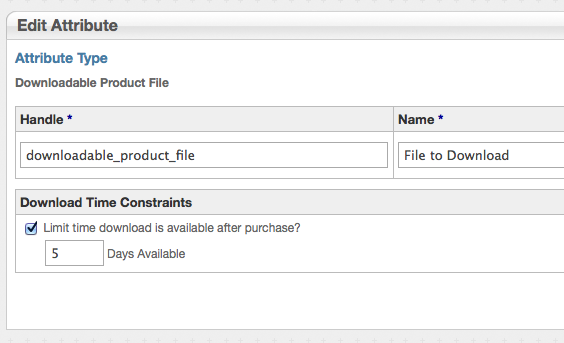
You can limit the amount of time your customers will be able to download their file by adjusting the value of the File to Download product attribute, included in the Digital Downloads package.

To do this, go to Dashboard > eCommerce > Settings > Attribute Settings and click the Product Attributes link. From the list of attributes, click File to Download. The Edit Attribute screen will appear. Check the the checkbox to enable Download Time Constraints and enter a value in the Days Available field.
edit_downloadable_product_attribute.png

What does the result look like for my customers?

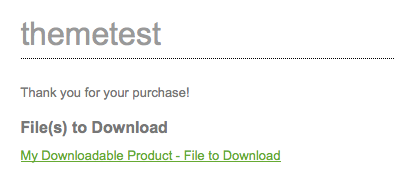
After a successful purchase, the customer is directed to a landing page where they'll be presented with a link to download the file they've purchased.
successful_purchase_digital_downloads.png

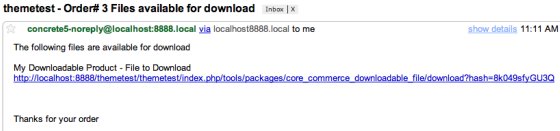
Customers will also be sent an email with a link to download their file:
successful_purchase_digital_downloads_email.png


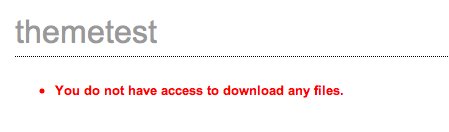
What happens if a user tries to go directly to the "success_download" URL?

If a visitor does not have the proper concrete5 cookie from the checkout session that made the purchase-- they'll see this message instead:
no_access_digital_downloads.png

Thumbnail Intermediate Core Team

Learn More

  • Digital Downloads Home
  • Pre-Sale Questions
  • Reviews
  • Questions & Discussion
  • License
  • Support
  • Version History
  • Roadmap
  • Features
  • Documentation
  • Version History
  • Marketplace
  • Add-Ons
  • Digital Downloads
  • Documentation

Do you have questions

  • What are users saying?
  • Who is using concrete5?
  • What makes concrete5 easy?
  • Why develop on concrete5?
 

We’re on “The Twitter”

RT @katzueno: 今夜 22時も週刊 #concrete5 です http://t.co/80y6Bk0l ゲストが来るかも?それとも普通の放送かも?^KU

Follow concrete5

About

  • Try it Out
  • For Developers
  • For Agencies
  • For Designers
  • For Anyone
  • Testimonials
  • Showcase
  • History
  • Our Philosophy
  • Credits
  • What does free mean?
  • Blog

Community

  • Members
  • Forums
  • Chat
  • International
  • Jobs
  • eNewsletters

Developers

  • Download concrete5
  • Join Beta Team
  • Translate concrete5
  • Bug Tracker
  • Beta
  • Submit to Marketplace
  • Code Submissions
  • News
  • Community Leaders
  • User Doc Group

Marketplace

  • Add-Ons
  • Themes
  • Add-on Installation
  • Deal Of The Day
  • Swag

Services

  • Hosting
  • Support Options
  • Consulting
  • Training
  • Enterprise

Documentation

  • Getting Started
  • Editor's Guide
  • Developers Guide
  • How-Tos

Legal

  • Privacy Policy
  • Terms of Use
  • Refund Policy
  • Contact Us
© 2008 to 2012 Concrete CMS Inc. All Rights Reserved.

Sign In?

You must have a user account and be signed to perform this action.

  • Sign In
  • Register