• Join Now
  • Sign In
  • Cart
  • Instant Setup
  • Download
Logo
  • About
    • Try it Out
    • For Developers
    • For Agencies
    • For Designers
    • For Anyone
    • Testimonials
    • Showcase
    • History
    • Our Philosophy
    • Credits
    • What does free mean?
    • Blog
  • Community
    • Members
    • Forums
    • Chat
    • Karma
    • International
    • Jobs
    • eNewsletters
  • Developers
    • Download concrete5
    • Join Beta Team
    • Translate concrete5
    • Bug Tracker
    • Submit to Marketplace
    • Code Submissions
    • News
    • Community Leaders
  • Marketplace
    • Add-Ons
    • Themes
    • Add-on Installation
    • Deal Of The Day
    • Swag
    • Theme Contest 2012
  • Services
    • Hosting
    • Support Options
    • Consulting
    • Training
    • Enterprise
  • Documentation
    • Getting Started
    • Editor's Guide
    • Developers Guide
    • How-Tos
  • Example FAQ

Documentation

What does it actually do?

Each FAQ Entry item you create from the Dashboard page becomes its own page in the Sitemap. The Example FAQ takes the text you've entered in the Dashboard form and uses it to set up the new page. The "Question" field becomes your page title, the "Brief Answer" is saved as the page's description, and the "Full Answer" page is placed in a content block on the new page.

Step 1: Select your FAQ parent page(s)

First, we need to tell the Example FAQ where to place our entries. To do this, we need to choose a page from the sitemap and edit its Page Properties.

I've created a new page called "My FAQ". Now let's edit its Page Properties to give it the special "FAQ Section" Custom Attribute:
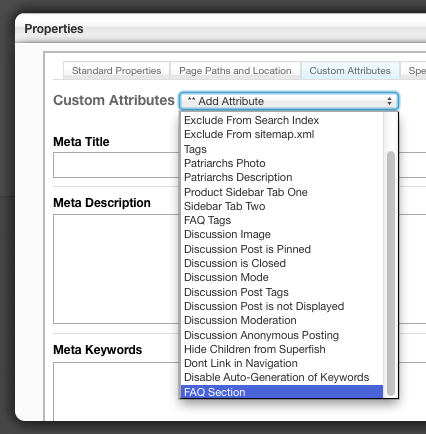
example_faq_documentation3.png

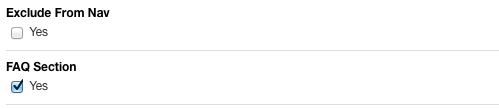
Make sure to scroll down to the bottom of the dialogue to check the "FAQ Section" checkbox and click Save:
example_faq_documentation4.png

Step 2: Add Some FAQ entries!

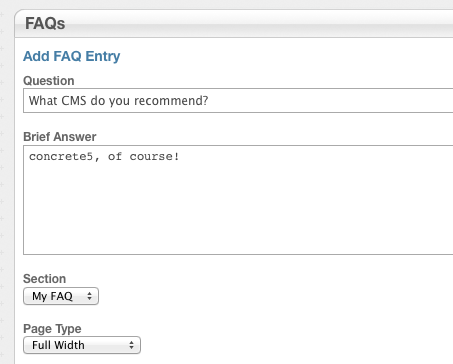
Now you'll be able to add some FAQ entries. Go to Dashboard > FAQ Entries and select "Click here to add a new FAQ Entry". You'll notice that the page that we gave the FAQ Section attribute now appears in the Section" dropdown:
 

example_faq_documentation6.png

Save your entry. Repeat as needed. Now it's time to...

Step 3: Display your FAQ entries on a page

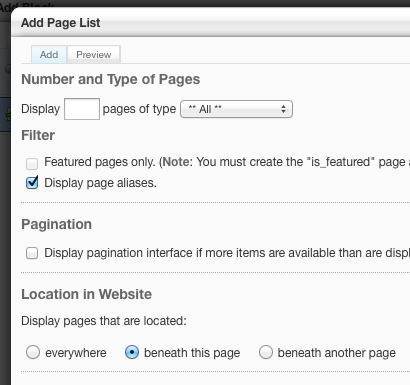
I'd like to display all my FAQ Entries on the page I created called "My FAQ". Let's navigate to that page, put it in edit mode, and place a new Page List block somewhere on the page. Since I set up my FAQ to create FAQ Entry pages beneath the page we're editing, I'll set the block to display all pages beneath the current page:
example_faq_documentation8.png


This gives us a list of our FAQ entries, but what if we want to make it a little better looking? We can apply the Custom Template for the Page List block that's included in the package to show / hide answers. To do this, we'll need to put the page in edit mode and click the Page List block. Select "Custom Template" from the menu:
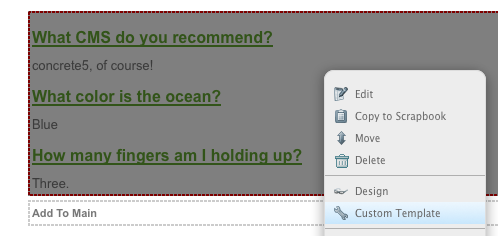
example_faq_documentation7.png

Then, select "Example FAQ Page List" from the dropdown menu and click update:
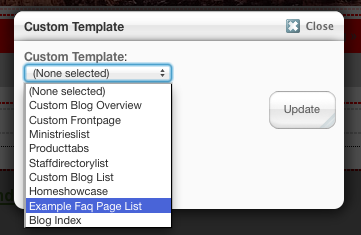
example_faq_documentation9.png

Publish your changes to the page, and visitors will now be shown the answers when they click the question. A "Read More" link will take them to the actual FAQ entry page where they will be shown the "Full Answer" we set up from the Dashboard.
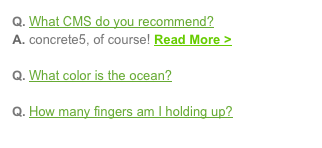
example_faq_documentation10.png

Thumbnail Intermediate Core Team

Learn More

  • Example FAQ Home
  • Pre-Sale Questions
  • Reviews
  • Questions & Discussion
  • Support & Feature Requests
  • License
  • Support
  • Roadmap
  • Features
  • Documentation
  • Version History
  • Marketplace
  • Add-Ons
  • Example FAQ
  • Documentation

Do you have questions

  • What are users saying?
  • Who is using concrete5?
  • What makes concrete5 easy?
  • Why develop on concrete5?
 

We’re on “The Twitter”

RT @concrete5japan: Mac の WEBコーディングソフト「Coda 2」リリーススペシャルUST番組 な週刊 #concrete5 を YouTube にアップ http://t.co/TcD80TOk 買うの迷っている人、貴重なナカノヒト、長谷川さん @noby829 さんの話をきこう! ^KU

Follow concrete5

About

  • Try it Out
  • For Developers
  • For Agencies
  • For Designers
  • For Anyone
  • Testimonials
  • Showcase
  • History
  • Our Philosophy
  • Credits
  • What does free mean?
  • Blog

Community

  • Members
  • Forums
  • Chat
  • International
  • Jobs
  • eNewsletters

Developers

  • Download concrete5
  • Join Beta Team
  • Translate concrete5
  • Bug Tracker
  • Beta
  • Submit to Marketplace
  • Code Submissions
  • News
  • Community Leaders
  • User Doc Group

Marketplace

  • Add-Ons
  • Themes
  • Add-on Installation
  • Deal Of The Day
  • Swag

Services

  • Hosting
  • Support Options
  • Consulting
  • Training
  • Enterprise

Documentation

  • Getting Started
  • Editor's Guide
  • Developers Guide
  • How-Tos

Legal

  • Privacy Policy
  • Terms of Use
  • Refund Policy
  • Contact Us
© 2008 to 2012 Concrete CMS Inc. All Rights Reserved.

Sign In?

You must have a user account and be signed to perform this action.

  • Sign In
  • Register